Application
Audience: Architects, Application and smart contract developers
In our scenario, organizations access PaperNet using applications which invoke issue, sell and redeem transactions defined in a commercial paper smart contract. MagnetoCorp’s application starts straightforwardly – it just needs to issue a commercial paper.
Let’s walk through the commercial paper sample application provided with Hyperledger Fabric. You can download the sample and play with it locally. It is written in JavaScript, but the logic is quite language independent, so you’ll be easily able to see what’s going on! (The sample will become available for Java and GOLANG as well.)
Fabric SDK
Applications interact with PaperNet using the Fabric SDK. Here’s a simplified diagram of how an application invokes a smart contract:
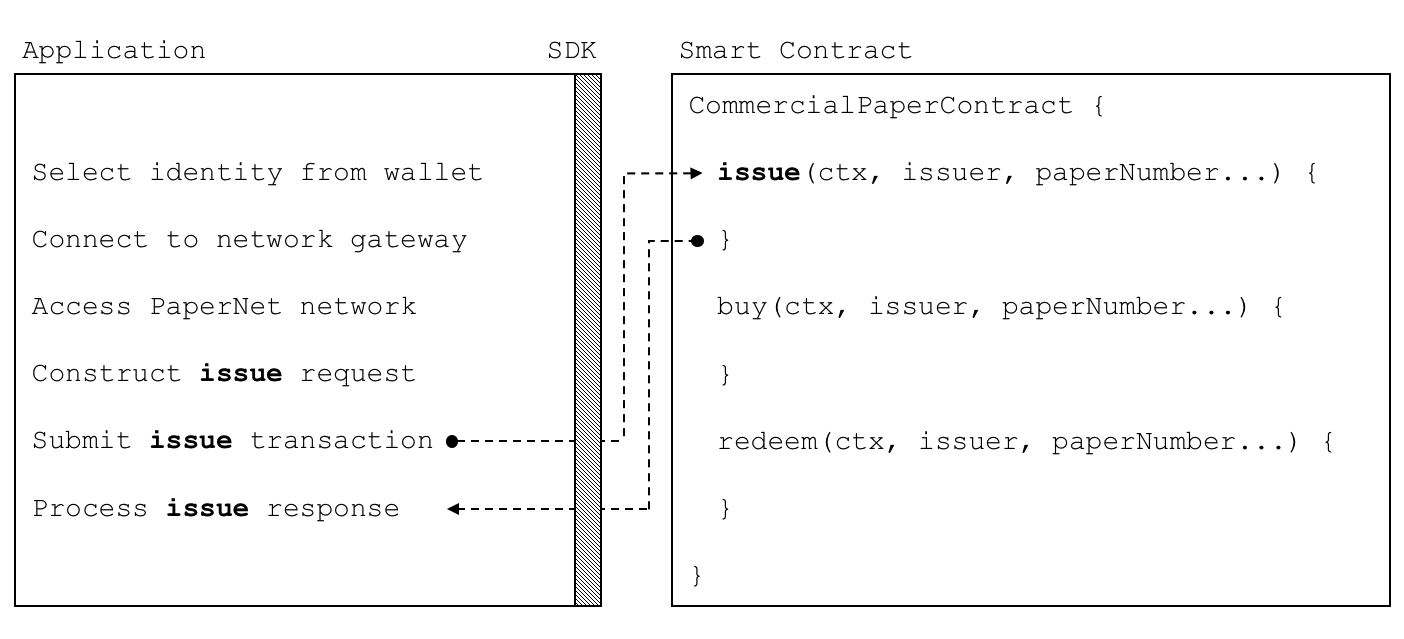 A PaperNet application invokes
the commercial paper smart contract to submit the issue transaction
A PaperNet application invokes
the commercial paper smart contract to submit the issue transaction
You’re going to see how a typical application uses APIs provided by the Fabric SDK to interact with a Fabric network. The SDK takes care of all the low-level details, making it really easy for an application to submit a transaction without worrying about the underlying network topology.
You’ll find the application code in application.js –
view it with your browser, or
open it in your favourite editor if you’ve downloaded it. Spend a few moments
looking at the overall structure of the application; even with comments and
spacing, it’s only 50 lines of code!
Application wallet
Towards the top of application.js, you’ll see two Fabric classes are brought
into scope:
const { FileSystemWallet, Gateway } = require('fabric-network');
You can read about these classes in the node.js SDK on-line documentation, but for now, let’s see how they are used to connect MagnetoCorp’s application to PaperNet. The application uses the Fabric Wallet class as follows:
const wallet = new FileSystemWallet('./wallet');
A Fabric wallet holds the digital equivalents of a government ID, driving license or ATM card that you might find in your own wallet. Nowadays, wallets hold mostly identity information rather than cash, and Fabric wallets are similar; they hold the digital certificates that associate an application with a organization, thereby entitling them to rights in a network channel.
See how wallet locates a filesystem wallet for application.js. The
./wallet directory holds a set of identities – X.509 digital certificates –
which can be used to access a PaperNet or any other Fabric network. Look in this
directory and examine its contents.
In PaperNet, the certificate provided by MagnetoCorp application user will determine which operations they can perform, according to their role. Moreover, the digital certificate can be retrieved during smart contract processing using the transaction context.
Peer gateway
The second key class is a Fabric Gateway. Most importantly, a
gateway identifies one or more peers that provide access to a
network – in our case, PaperNet. See how application.js connects to its
gateway:
await gateway.connect(connectionProfile, connectionOptions);
gateway.connect() has two important parameters:
- connectionProfile: the file system location of a connection profile that identifies a set of peers as a gateway to PaperNet
- connectionOptions: a set of options used to control how
application.jsinteracts with PaperNet
Spend a few moments examining the connection profile
./gateway/connectionProfile.yaml
YAML file.
Right now, we’re only interested in the channels: and peers: sections:
channels:
  PaperNet:
    peers:
      peer1.magnetocorp.com:
        endorsingPeer: true
        eventSource: true

      peer2.digibank.com:
        endorsingPeer: true
        eventSource: true

peers:
  peer1.magnetocorp.com:
    url: grpcs://localhost:7051
    grpcOptions:
      ssl-target-name-override: peer1.magnetocorp.com
      request-timeout: 120
    tlsCACerts:
      path: certificates/magnetocorp/magnetocorp.com-cert.pem

  peer2.digibank.com:
    url: grpcs://localhost:8051
    grpcOptions:
      ssl-target-name-override: peer1.digibank.com
    tlsCACerts:
      path: certificates/digibank/digibank.com-cert.pem
See how channel: identifies the PaperNet: network channel, and two of its
peers. MagnetoCorp has peer1.magenetocorp.com and DigiBank has
peer2.digibank.com, and both have the role of endorsing peers. Link to these
peers via the peers: key, which contains details about how to connect to them,
including their respective network addresses.
The connection profile contains a lot of information – not just peers – but network channels, network orderers, organizations, and CAs, so don’t worry if you don’t understand all of it!
See how the connection profile is loaded and converted into a JSON object:
connectionProfile = yaml.safeLoad(file.readFileSync('./gateway/connectionProfile.yaml', 'utf8'));
Let’s now look at the connectionOptions object:
let connectionOptions = {
  identity: 'isabella.the.issuer@magnetocorp.com',
  wallet: wallet
}
See how it specifies that identity, isabella.the.issuer@magnetocorp.com, and
wallet, wallet, should be used to connect to a gateway.
Under the covers, the SDK will use the connectionOptions and gateway details
to send the transaction proposal to the right peers in the network. See how the
client application need not be concerned with this any more, the SDK will take
care of it all!
There are other connection options which enable the SDK to act intelligently on behalf of an application. For example:
let connectionOptions = {
  identity: 'isabella.the.issuer@magnetocorp.com',
  wallet: wallet,
  eventHandlerOptions: {
    commitTimeout: 100,
    strategy: EventStrategies.MSPID_SCOPE_ANYFORTX
  },
}
Here, commitTimeout tells the SDK to wait 100 seconds to hear whether a
transaction has been committed. And strategy: EventStrategies.MSPID_SCOPE_ANYFORTX specifies that the SDK can notify an
application after a single MagnetoCorp peer has confirmed the transaction, in
contrast to strategy: EventStrategies.NETWORK_SCOPE_ALLFORTX which requires
that all peers from MagnetoCorp and DigiBank to confirm the transaction.
If you’d like to, read more about how connection options allow applications to specify goal-oriented behaviour without having to worry about how it is achieved.
Access network channel
The peers defined in the gateway connectionProfile.yaml provide
application.js with access to PaperNet. Because these peers can be joined to
multiple network channels, the gateway actually provides the application with
access to multiple network channels!
See how the application selects a particular channel:
const network = await gateway.getNetwork('PaperNet');
From this point onwards, network will provide access to PaperNet. Moreover,
if the application wanted to access another network, BondNet, at the same
time, it is easy:
const network2 = await gateway.getNetwork('BondNet');
Now our application has access to a second network, BondNet, simultaneously
with PaperNet!
We can see here a powerful feature of Hyperledger Fabric – applications can
participate in a network of networks, by connecting to multiple gateway
peers, each of which is joined to multiple network channels. Applications will
have different rights in different channels according to their wallet identity
provided in gateway.connect().
Construct request
The application is now ready to issue a commercial paper. To do this, it’s
going to use CommercialPaperContract and again, its fairly straightforward to
access this smart contract:
const contract = await network.getContract('papercontract', 'org.papernet.commercialpaper');
Note how the application provides a name – papercontract – and the optional
namespace of a contract: org.papernet.commercialpaper! We see how a
namespace picks out a particular contract from a chaincode
file such as papercontract.js that contains many contracts. In PaperNet,
papercontract.js was installed and instantiated with the name papercontract,
and if you’re interested, read how to install and instantiate a chaincode
containing multiple smart contracts here.
If our application simultaneously required access to another contract in PaperNet or BondNet this would be easy:
const euroContract = await network.getContract('EuroCommercialPaperContract');

const bondContract = await network2.getContract('BondContract');
In these examples, note how we didn’t use a qualifying namespace – we assumed only one contract per file.
Recall the transaction MagnetoCorp uses to issue its first commercial paper:
Txn = issue
Issuer = MagnetoCorp
Paper = 00001
Issue time = 31 May 2020 09:00:00 EST
Maturity date = 30 November 2020
Face value = 5M USD
Let’s now submit this transaction to PaperNet!
Submit transaction
Submitting a transaction is a single method call to the SDK:
const response = await contract.submitTransaction('issue', 'MagnetoCorp', '00001', '2020-05-31', '2020-11-30', '5000000');
See how the submitTransaction() parameters match those of the transaction
request. It’s these values that will be passed to the issue() method in the
smart contract, and used to create a new commercial paper. Recall its signature
and basic structure:
async issue(ctx, issuer, paperNumber, issueDateTime, maturityDateTime, faceValue) {...}
It might appear that a smart contract receives control shortly after the
application issues submitTransaction(), but that’s not the case. Under the
covers, the SDK uses the connectionOptions and gateway details to send the
transaction proposal to the right peers in the network, where it can get the
required endorsements. But the application doesn’t need to worry about any of
this – it just issues submitTransaction and the SDK takes care of it all!
Let’s now turn our attention to how the application handles the response!
Process response
See how the issue transaction returns a commercial paper response:
return cp.serialize();
You’ll notice a slight quirk – the new commercial paper cp needs to be
returned as buffer using serialize() to be returned to the application. Notice
how application.js uses the class method deserialize() to rehydrate the
response buffer as a commercial paper:
let paper = CommercialPaper.deserialize(response);
allowing paper to be used in a natural way in a descriptive completion
message:
console.log(`${paper.issuer} commercial paper : ${paper.paperNumber} successfully issued for value ${paper.faceValue}`);
See how the same paper class has been used in both the application and smart
contract – if you structure your code like this, it’ll really help readability
and reuse.
As with the transaction proposal, it might appear that the application receives
control soon after the smart contract completes, but that’s not the case. Under
the covers, the SDK manages the entire consensus process, and notifies the
application when it is complete according to the strategy connectionOption. If
you’re interested in what the SDK does under the covers, read the detailed
transaction flow.
That’s it! In this topic you’ve understood how to call a smart contract from a sample application by examining how MagnetoCorp’s application issues a new commercial paper in PaperNet. Now examine the key ledger and smart contract data structures are designed by in the architecture topic behind them.